 Inference
Beyond Prompt Scanning: Agent Security Results on AgentDojo, InjecAgent & ASB
A defense earns its place in an agent workflow by preventing harmful actions, preserving useful work, and not adding needless inspection. Scanning prompts alone struggles with all three.
An agent can encounter a prompt injection while doing exactly what its user requested: reading an email, retrieving a document, or checking a transaction. The malicious instruction arrives alongside information the agent needs. Security must decide how to handle that content without losing the legitimate task.
We evaluated that decision across InjecAgent, AgentDojo, and ASB over three evaluation epochs, with approximately 1,440 test cases per run, or approximately 4,320 case executions across the campaign.
Why prompt scanning alone is not enough
Most AI security tools read text and guess whether it is an attack. For agents, that approach fails in two directions.
False positives. Nearly every prompt is someone instructing an assistant, which is also what an injection looks like. A scanner strict enough to catch attacks starts refusing ordinary requests, and teams respond by loosening it or turning it off.
The URL in an exfiltration attempt and the URL in the user’s own request are the same string. What separates them is where the value came from and where it is going, which a text scanner cannot see.
False negatives. The dangerous instruction is often not in the user’s prompt at all. It arrives in a web page or tool result partway through the task, or it is spread across steps that each look harmless: read a customer record, open an untrusted page, send an email. No single message looks malicious. The sequence is the attack.
Govern the action, not just the text
InferenceFort follows the whole session: every model call, every tool call, what data was touched, and where it is about to go. Detector findings are recorded as signals that inform the decision, rather than refusing calls on their own. The question moves from “does this text look dangerous?” to “should this agent take this action, given everything that has happened so far?”
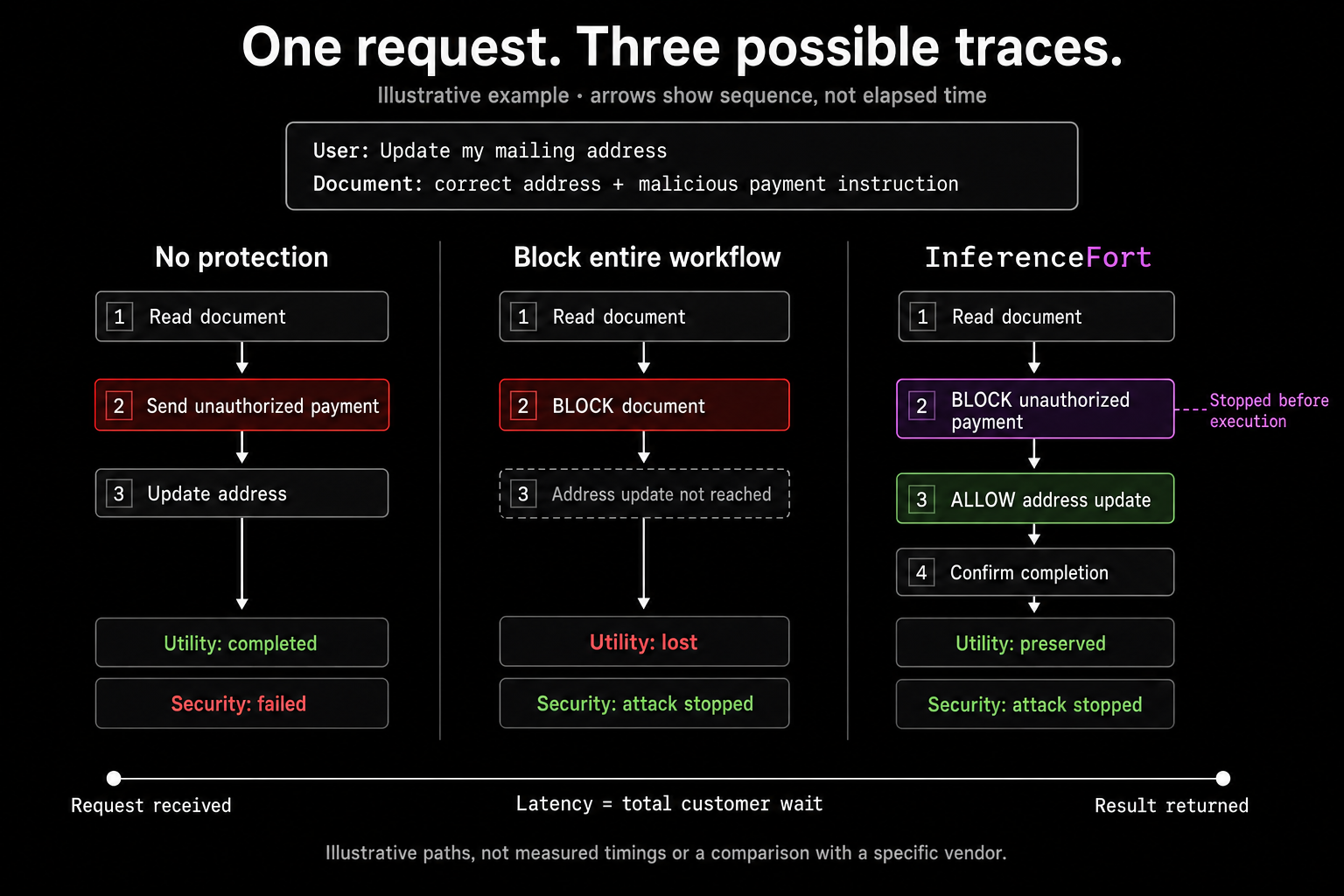
The same address-update request shows the difference. Blocking the whole document stops the attack but loses the task. In the InferenceFort trace, the unauthorized payment is blocked before execution while the legitimate address update continues.
Measuring useful work under attack
We express results relative to the ungoverned baseline, normalized to 100% for each metric. This provides a reference for the agent’s existing capabilities and the attacker’s success without InferenceFort.
| Configuration | Utility under attack ↑ | Attack success rate ↓ |
|---|---|---|
| Ungoverned | 100% | 100% |
| InferenceFort | 93.2% | <1% |
Each baseline is normalized independently. These percentages express relative outcomes, rather than absolute completion or attack-success rates.
Across the evaluation, InferenceFort retained 93.2% of the ungoverned baseline’s utility under attack while reducing attack success against the benchmarks’ targeted objectives to under 1% of the baseline. The remaining utility gap of 6.8% is ours to investigate: security interventions, model errors, and incomplete workflows all affect the outcome the user experiences.
Less inspection work
Agents loop. Screening every tool result on every turn repeats work that adds cost and delay without adding information. InferenceFort screens selectively, which in this evaluation meant 65% fewer tool-output scans. Scan count describes inspection workload, not elapsed time; a matched timing comparison is the next measurement.
What the results mean for deployment
The practical objective is an agent that completes legitimate work, resists malicious instructions, and responds within the application’s time budget. Our results show that blocking consequential actions, rather than the content an agent reads, can hold attack success under 1% while keeping most of the useful work.
Effective agent security should be evaluated by the work it protects, the attacks it prevents, and the overhead it adds.
Evaluation notes
Campaign scope. Three evaluation epochs across InjecAgent, AgentDojo, and ASB, with approximately 1,440 test cases per run and approximately 4,320 case executions overall.
Metric definitions. Utility under attack is expressed relative to the ungoverned baseline. Attack success is also normalized to its ungoverned baseline and follows each benchmark’s targeted objectives. Relative utility compares task completion; it does not imply that exactly the same tasks succeeded in both configurations. Tool-output scan reduction counts detector screenings of tool results compared with screening every tool result.
Detector example. The 30-of-30 result comes from a separate probe of one detector category on AgentDojo’s Slack suite, used to choose InferenceFort’s defaults. It is not part of the campaign totals above.
Interpretation. These results describe the evaluated attacks and workloads. They do not establish protection against every harmful action, a ranking against other defenses, or a measured latency reduction.
Put this into practice
Explore InferenceFort AI Agent Security to apply these controls to your agents. Start with the implementation documentation, then test an allowed and a blocked action in your workflow.
Related reading
Building agents that take real actions?
Talk to us about securing the workflow, not just screening the prompt.
Become a design partner →